Capture vehicles from the lot, not from your desk.
Use a phone-friendly workflow to decode VINs, capture vehicle photos, follow a walk-around process, and help get inventory ready faster.
The challenge
The vehicle is on the lot. The data entry is somewhere else.
Photos pile up on personal phones, VINs get scribbled on paper and typed in later, and key angles get missed - so vehicles sit unadvertised for days. Every trip between the lot and the desk is time the vehicle is not online.
How LotRanger helps
Stand beside the vehicle and get it sale-ready
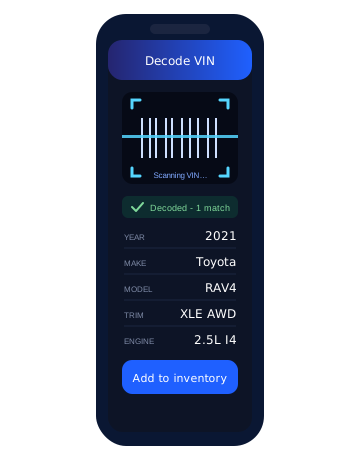
The phone app makes it easier for staff to stand beside the vehicle, capture the VIN, take the right photos with a guided walk-around process, and push the vehicle toward being ready for sale. Captured data and photos flow straight into LotRanger inventory.
What's included
What the mobile capture workflow covers
- VIN capture and VIN decoding
- Mobile-friendly vehicle entry
- Photo upload from the lot
- Guided walk-around photo workflow
- Standard exterior and interior angles
- Fewer missing photos
- Vehicles online faster
- Captured data and photos connected to LotRanger inventory
How it works
From the lot to listed
01
Walk up to the vehicle and capture the VIN with your phone
02
The VIN decodes into vehicle details automatically
03
Follow the guided walk-around to capture every standard angle
04
Photos and details upload into LotRanger inventory
05
Finish details at the desk and push the vehicle toward sale-ready
Common questions
Mobile capture questions
Does the app decode VINs?
Yes. Capture the VIN at the vehicle and it decodes into vehicle details that flow into LotRanger inventory.
What is the walk-around photo workflow?
A guided process that steps staff through standard exterior and interior photo angles, so listings end up complete and consistent with fewer missing photos.
Do photos still end up on personal phones?
No. Photos upload directly into LotRanger inventory, so they stay with the vehicle record instead of scattered across devices.
Who is the app for?
Anyone on the lot - sales staff, lot attendants, or managers - who needs to get a vehicle captured and moving toward sale-ready.